Expertise · PMO & portfolio
After Project Online: change tools, or change how you manage?
Microsoft shut down Project Online on September 30, 2026. Many PMOs are looking for the closest lookalike, so that the switch goes unnoticed. I think that is the wrong question: a migration is the only moment when you can rethink how you manage without stopping the projects.
Cyril Verbrugghe, CEO and co-founderPublished
The problem: a project tool used for a portfolio
Project Online served well for years, and generations of project managers know its logic inside out. Microsoft announced its retirement in 2025, stopped selling it to new customers on October 1, 2025, and shut it down on September 30, 2026. Project desktop, Project Server Subscription Edition and Planner are not affected.
In the organizations I meet, though, the tool was doing something other than what it was designed for. It tracked portfolios of dozens, sometimes hundreds, of projects drawing on the same teams. Consolidation happened on the side, in spreadsheets, once a month. Trade‑offs between projects were settled in meetings, based on those extracts, with only a partial view of the actual workload.
Why it is tempting to reproduce what you had
The migration arrives as a constraint, with a deadline. The reflex of a PMO under pressure is to limit risk: carry over the same fields, the same views, the same reports, and aim for a frictionless switch. That is understandable, and it is what most "compatible" offerings promise.
Yet Project Online's limits were not flaws in the tool, but limits of scope. Each project lives in its own schedule. Budgets, capacity and cross‑project dependencies are handled separately. When an assumption changes, recalculating an alternative by hand takes days, sometimes weeks, so often none gets studied at all. And the quality of management rests on the experience of a few planners: each new project starts almost from scratch, without benefiting from what earlier ones learned.
Reproducing that setup elsewhere means paying for a migration to keep the same blind spots.
What changes if you use the switch
Three decisions, taken during the migration, cost little and pay off for a long time.
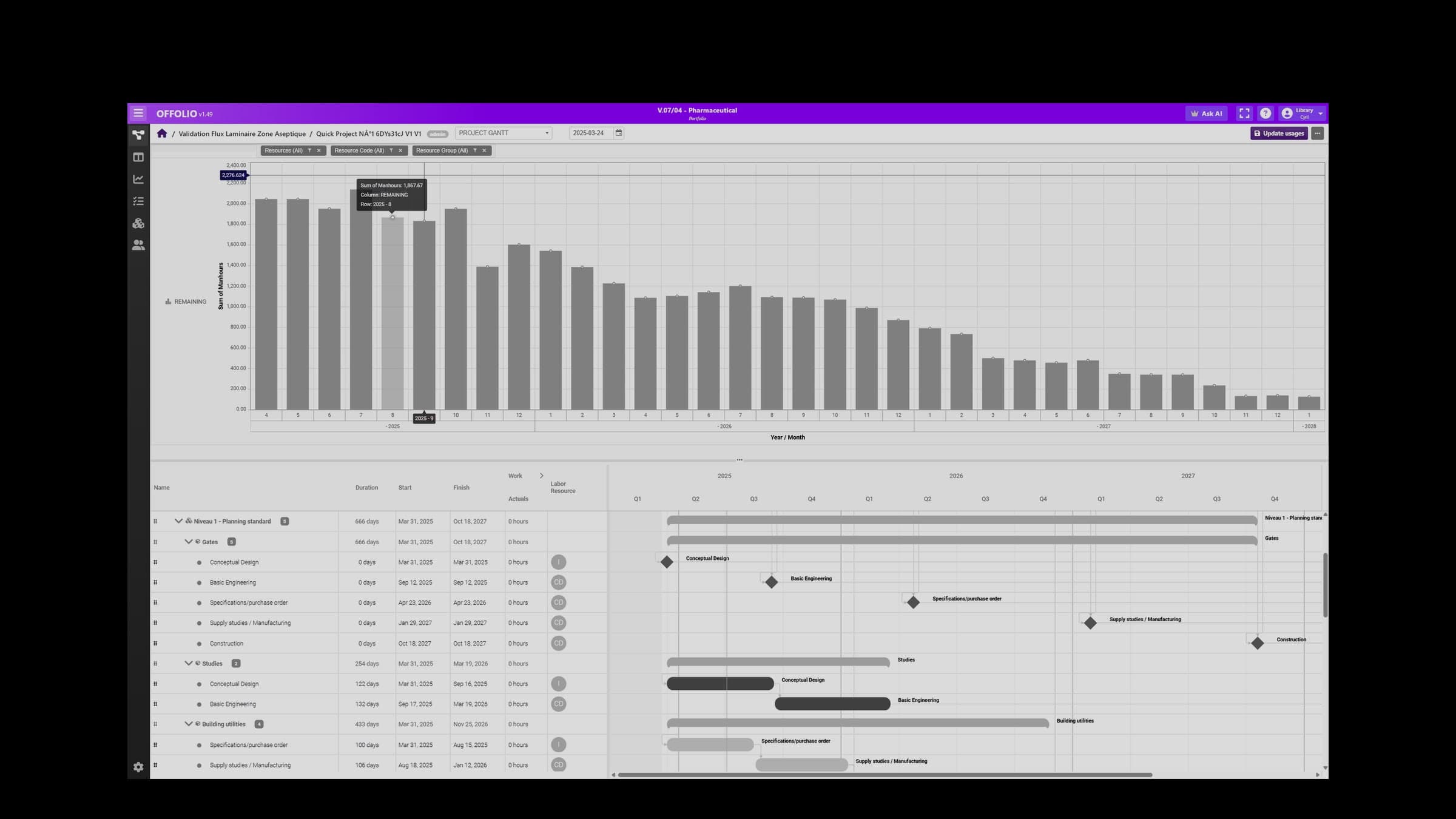
Move from project to portfolio. The workload of every project is consolidated continuously against capacity, by discipline and by period. Over‑allocation shows up months before it turns into slippage, and the trade‑off between two projects competing for the same team is made on numbers.
Handle constraints together. Resources, contractual milestones, budgets and cross‑project dependencies go into the same model. Pushing back a work package or reinforcing a team is simulated before it is decided, and the committee compares several scenarios instead of approving a single one.
Keep history as data. Exported schedules record actual durations, slippage, sequences that held or did not. Once structured, they let you estimate the next projects from what really happened in your organization rather than from theoretical durations.
None of this means throwing everything away. Detailed schedules often keep living in MS Project desktop, Primavera or Planisware; the portfolio management layer connects to them.
In the field
The rollouts we run at OFFOLIO go live in less than three months, including migration of existing projects and integration with the information system. What I see most often: the first committee that sees the consolidated workload of the whole portfolio discovers an over‑allocation no spreadsheet showed, and makes its first trade‑off decision on a simulation rather than on intuition. On the planning side, generative scenario planning multiplies by ten the number of options a team can produce and compare.
Where to start
- Check that the full history, closed projects included, has been exported and remains readable outside Project Online.
- List the three trade‑offs your committee found hardest to settle last year, and what it lacked to decide.
- Define the portfolio data to track: workload by discipline, capacity, contractual milestones, expected value.
- Pick a pilot scope of a few projects that share the same resources.
- Decide what stays in your planning tools and what moves up to portfolio level.
Frequently asked questions
Should Project Online be replaced with an equivalent tool?
What should we do with the exported schedules?
Can we keep MS Project for detailed scheduling?
Further reading
- Use case: Portfolio capacity planning
- Module: SMART PPM
- Glossary: PPM, Capacity planning, Lessons learned
A migration to prepare?
Ask an expertSources
- Microsoft, announcement of the retirement of Microsoft Project Online on September 30, 2026, Microsoft Planner Blog (Microsoft Tech Community), 2025.
- OFFOLIO internal rollout measurements (time to go live, scenario planning capacity).